


|
Quantity
|
Out of stock
|
||
|
|
|||
|
|
|||
Key features of: MERCUSYS (MW301R)
- Efficient Home Network: The MERCUSYS MW301R is a single-band wireless router designed to provide reliable internet access in small spaces.
- Speeds up to 300 Mbps: Wi-Fi 4 (802.11n) support ensures sufficient bandwidth for web browsing, email, and standard-quality video streaming.
- Two External 5dBi Antennas: Guarantee improved coverage and signal stability compared to internal antennas.
- Fast Ethernet: 10/100 Mbps LAN ports provide reliable wired connectivity for computers and other network devices.
The MERCUSYS MW301R Wireless Router provides a stable single-band 2.4 GHz Wi-Fi connection with speeds up to 300 Mbps, adhering to the Wi-Fi 4 (802.11n) standard. Equipped with two external 5dBi antennas, this model is ideal for creating a reliable home network capable of handling everyday tasks. If you are planning to buy in Kyiv an efficient network device whose current price makes it accessible, this router offers a balanced solution. Among MERCUSYS routers, the MW301R stands out for its ease of setup and stability for basic needs.
Overview of: MERCUSYS (MW301R)
Technological Basis for a Reliable Connection
The MW301R wireless router is built on proven network standards that ensure stable and secure data transmission. Its architecture is focused on efficient use of available resources to create a functional home network.
- Wi-Fi 4 Wireless Standard: The device operates on the 802.11n standard, which provides a maximum wireless data transfer rate of up to 300 Mbps at 2.4 GHz.
- Fast Ethernet Wired Interfaces: Integrated Ethernet LAN ports support 10 and 100 Mbps speeds (10/100Base-T(X)), which is sufficient for most stationary devices such as desktop PCs, gaming consoles, or network printers.
- Comprehensive Security Protocols: Modern encryption algorithms are supported, including WPA, WPA-PSK, WPA2, WPA2-PSK, as well as older 64/128/152-bit WEP and WDS, ensuring the protection of your wireless network.
- IPv4 Network Protocol Support: Ensures broad compatibility with the current internet infrastructure.
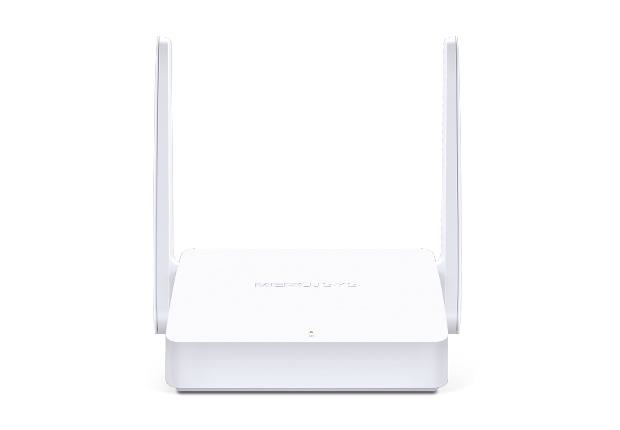
Advantages of Wi-Fi 4: MW301R vs. Older Standards
The MW301R model, operating on the Wi-Fi 4 (802.11n) standard, offers significant improvements over previous generation devices such as Wi-Fi 3 (802.11g). This router is an optimal solution for those looking for a reliable and productive device for basic needs.
- Increased Data Transfer Speed: Unlike 802.11g, which is typically limited to 54 Mbps, Wi-Fi 4 provides up to 300 Mbps, which is critically important for smoother video viewing and faster web page loading.
- Improved Coverage and Stability: The two external 5dBi antennas in the MW301R significantly outperform internal antennas or weaker external antennas of older models, providing a wider coverage area and minimizing "dead zones."
- Enhanced Network Efficiency: The 802.11n standard uses technologies such as MIMO (Multiple-Input Multiple-Output), which allows simultaneous transmission and reception of data over multiple streams, improving overall throughput and connection reliability compared to 802.11g.
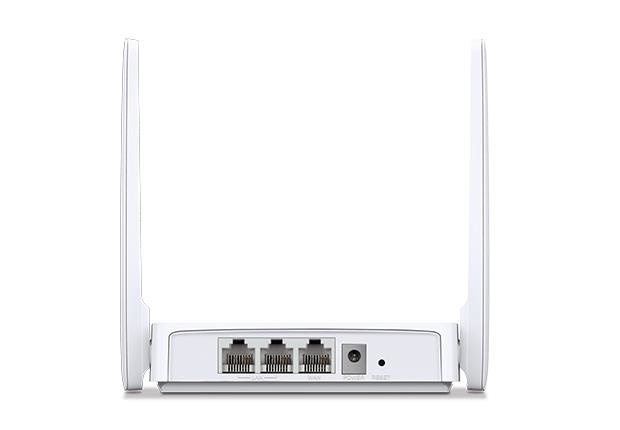
Optimal Choice for Basic Tasks
The MERCUSYS MW301R is designed for users who need reliable and functional network equipment without excessive features and overpayments. This model demonstrates an excellent balance between performance and affordability, making quality Wi-Fi accessible for every home.
- Affordability without Compromise: Offers all necessary features for stable home internet while remaining in the budget segment.
- Reliable 2.4 GHz Connection: The single-band 2.4 GHz network is ideal for most everyday tasks, providing wide coverage and compatibility with older devices.
- Easy Installation and Management: An intuitive web setup page allows even inexperienced users to quickly get the router up and running.
Ideal Solution for Your Needs
Setup Guide: MERCUSYS (MW301R)
- Download and install the TP-Link Tether app on your smartphone from the App Store or Google Play.
- Connect to the router's Wi-Fi network (the network name and password are on the sticker at the bottom of the device) and launch the Tether app.
- Follow the step-by-step instructions in the app to complete the internet connection and Wi-Fi settings.
Need Expert Assistance?
Still have questions about the specs? Engineer Sergey is ready to provide a detailed consultation.
FAQ
What are the main characteristics of the MERCUSYS MW301R wireless router that are important for home use?
This router operates in single-band mode (2.4 GHz) according to the Wi-Fi 4 (802.11n) standard and provides a maximum speed of up to 300 Mbps. It is equipped with two external 5dBi antennas for better coverage and 10/100 Mbps Fast Ethernet ports.
Does this router support modern security standards to protect my Wi-Fi network?
Yes, the device supports a wide range of data encryption algorithms, including WPA, WPA-PSK, WPA2, WPA2-PSK, as well as WEP and WDS, ensuring reliable protection for your wireless network.
How can I set up this MERCUSYS network equipment after purchase?
Setting up this router is done through an intuitive web page, making the process quick and easy even for users without deep technical knowledge.
What types of wired connections does this model support?
The device is equipped with Fast Ethernet (10, 100 Mbps) ports for LAN connections and one RJ-45 port for WAN connection, providing flexibility in connecting to the internet and local network.