


|
Quantity
|
Out of stock
|
||
|
|
|||
|
|
|||
Key features of: MERCUSYS (MW305R)
- This is a reliable desktop Wi-Fi router designed for stable internet access in small spaces.
- Provides wireless speeds of up to 300 Mbps in the 2.4 GHz band.
- Equipped with three external 5dBi antennas for wide coverage.
- Supports wired connection via Fast Ethernet 10/100 Mbps ports.
The MERCUSYS MW305R is a single-band wireless router that provides stable Wi-Fi connectivity at 2.4 GHz with speeds up to 300 Mbps. This compact desktop router is ideal for creating a reliable home network, supporting the main Wi-Fi 4 (802.11n) standards. Thanks to three external 5dBi antennas, the MERCUSYS device guarantees wide and reliable coverage. If you are looking to buy an effective and inexpensive solution in Kyiv for everyday tasks, then among MERCUSYS routers, this model offers an optimal balance of performance and simplicity. Its current price makes it a cost-effective choice for any home.
Overview of: MERCUSYS (MW305R)
Fundamental Network Characteristics
The MERCUSYS MW305R is a desktop router designed based on a MediaTek chipset, ensuring reliable operation of network functions. The device is focused on creating an effective wireless infrastructure with support for key protocols.
- Wi-Fi 4 (802.11n) Standard: The router operates in a single-band 2.4 GHz mode, conforming to the IEEE 802.11n standard, with backward compatibility with 802.11b and 802.11g, ensuring connectivity for a wide range of wireless clients. Maximum WLAN throughput reaches 300 Mbps.
- Fast Ethernet Interfaces: For wired connections, Fast Ethernet ports are provided, supporting speeds of 10 and 100 Mbps, which is sufficient for most wired devices such as PCs, gaming consoles, or Smart TVs.
- IPv4 Support: At the core of the network architecture is the IPv4 protocol, providing standard routing and IP address management within the local network.
- Security Mechanisms: For wireless network protection, WPA-PSK and WPA2-PSK encryption algorithms are implemented, providing a standard level of security to prevent unauthorized access.
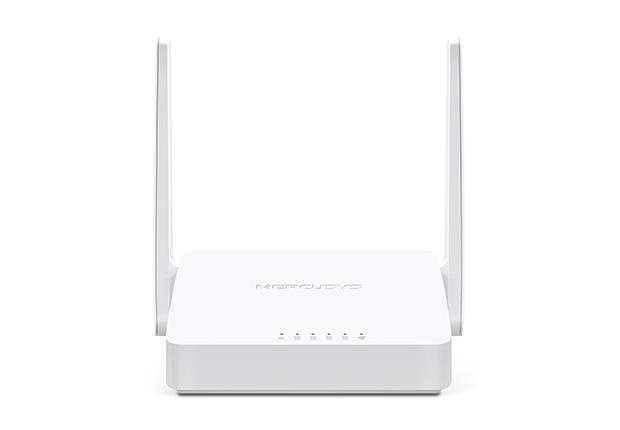
MW305R: Focus on Affordability and Stability
The MERCUSYS MW305R is designed as an economical and functional solution for basic needs, differing from more expensive and advanced routers by its set of characteristics optimized for everyday use.
- Single-Band vs. Dual-Band Operation: Unlike dual-band routers, the MW305R operates only in the 2.4 GHz band. This simplifies setup and provides wide coverage, ideal for small apartments where high 5 GHz throughput is not required.
- Wi-Fi 4 (802.11n) Standard: The MW305R model uses the proven Wi-Fi 4 standard, which is sufficient for most common tasks, whereas newer routers with Wi-Fi 5 or Wi-Fi 6 are geared towards high-load scenarios such as 4K streaming and VR gaming.
- Fast Ethernet Ports: The router is equipped with Fast Ethernet ports (10/100 Mbps), while many modern devices offer Gigabit Ethernet. For users with internet plans up to 100 Mbps, this is not a limitation, providing an economical and efficient wired connection.
- Simplicity and Affordability: The main advantage of the MW305R lies in its ease of installation and operation, as well as its affordability, making it an ideal choice for users who do not need the excessive features of more expensive models.
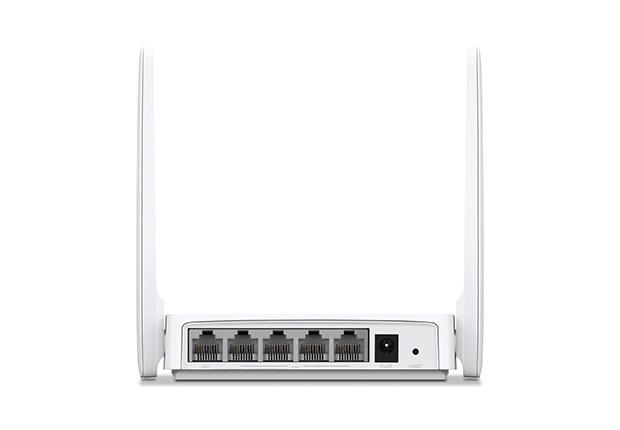
Optimal Choice for Basic Needs
The MERCUSYS MW305R is designed for users who need a reliable and easy-to-use router for everyday tasks such as web browsing, email, and standard-definition video streaming. It offers the necessary set of features for a stable home network without unnecessary costs.
- Stable 2.4 GHz Coverage: Single-band operation at 2.4 GHz ensures wide signal propagation, ideal for covering apartments or small homes, penetrating walls and obstacles.
- Speed up to 300 Mbps: The maximum wireless data transfer speed of 300 Mbps is sufficient for most home online activities, including YouTube viewing, document work, and social media communication.
- Three External Antennas: Equipped with three external 5dBi antennas, it significantly extends Wi-Fi coverage and provides a more stable connection for all connected devices.
- Simple and Fast Setup: An intuitive web interface ensures easy router configuration, allowing even inexperienced users to quickly set up a home network.
Setup Guide: MERCUSYS (MW305R)
- Connect an Ethernet cable from your computer to the LAN port on the router, and the WAN cable from your provider to the WAN port.
- Open a web browser and enter the address 192.168.0.1 (or 192.168.1.1, check the router's casing) to access the web interface.
- Enter your credentials (usually admin/admin by default), go to the "WAN Settings" section, and configure the connection type (PPPoE, Dynamic IP, Static IP) according to your provider's data.
Need Expert Assistance?
Having trouble choosing? Our lead specialist Vladimir will help you find the perfect solution tailored to your needs.
FAQ
What is the maximum wireless connection speed of the MERCUSYS MW305R Wi-Fi router, and what Wi-Fi standards does it support?
The maximum wireless data transfer speed of this router is 300 Mbps. It supports the primary Wi-Fi 4 (802.11n) standard, and is also compatible with earlier IEEE 802.11b and IEEE 802.11g standards.
What types of antennas are used in this model, and what is their gain?
The device is equipped with three external antennas, each with a gain of 5dBi, which contributes to expanding the Wi-Fi coverage area.
Does this router support dual-band Wi-Fi operation (2.4 GHz and 5 GHz)?
No, this router is single-band and operates only on the 2.4 GHz frequency.
What type of Ethernet ports are installed on the MERCUSYS MW305R device, and what speed do they provide?
The router is equipped with Fast Ethernet ports, which provide data transfer speeds of 10 and 100 Mbps for wired connections.
What network security protocols are available for data encryption on this router?
For wireless network protection, this router supports WPA-PSK and WPA2-PSK data encryption algorithms.
Which chipset is used in the MW305R router to ensure its operation?
The hardware platform of this router is based on a MediaTek chipset.
What network protocols does this model support for traffic routing?
This model supports the IPv4 network protocol for managing and routing network traffic.