







|
Quantity
|
Out of stock
|
||
|
|
|||
|
|
|||
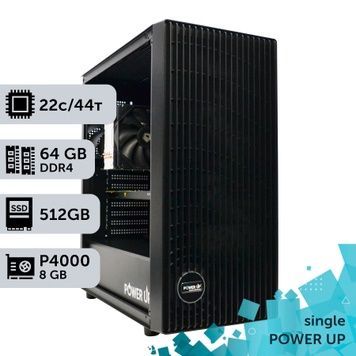
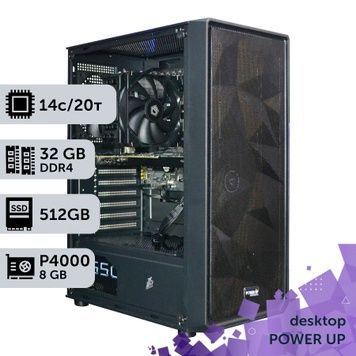
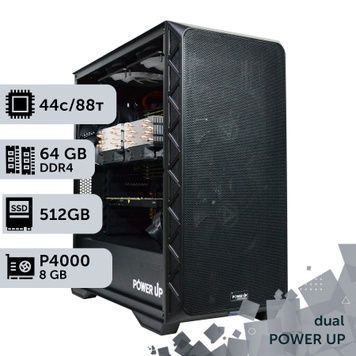
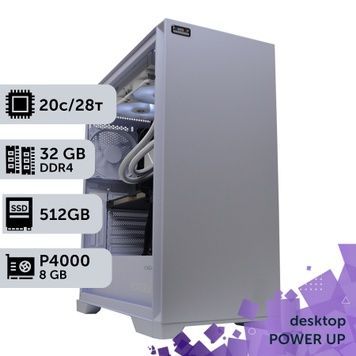
An NVIDIA Quadro P4000 workstation is a computer with a professional graphics card carrying 8 GB of GDDR5 for AutoCAD, SolidWorks, Revit, ArchiCAD, 2D graphics and work on 2–4 monitors. PowerUp builds these workstations on Intel Core, Core Ultra and AMD Ryzen, on Xeon E5 v4, and as dual-CPU systems on Xeon and AMD EPYC. The P4000 is a single-slot Pascal-generation card drawing 105 W, with four DisplayPort 1.4 outputs and drivers that CAD software developers test. It is an affordable way to get a professional graphics card with 8 GB of memory, but it is outdated for GPU rendering and neural networks: RTX cards handle those tasks 4–9 times faster. Every workstation runs a 4-hour load test, and the warranty is 2 years.
NVIDIA Quadro P4000 specifications
| Parameter | Quadro P4000 | What it means in practice |
|---|---|---|
| Architecture | Pascal, 2017 | No RT or Tensor cores: the card handles ray tracing and neural networks without hardware acceleration |
| Cores and performance | 1,792 CUDA cores, about 5.3 TFLOPS FP32 | Enough for CAD viewports and 2D, too little for GPU rendering |
| Graphics memory | 8 GB GDDR5, 256-bit, 243 GB/s | Mid-size SolidWorks assemblies and Revit models, textures in 3ds Max |
| Power and cooling | Up to 105 W, one 6-pin connector, blower fan, single slot | A quiet and cool system, suitable for compact cases |
| Outputs | 4× DisplayPort 1.4 | Up to 4 monitors at 4K 120 Hz or 5K 60 Hz |
| Video engines | NVENC and NVDEC for H.264 and HEVC | Encoding and playback of standard video; no AV1 and no 10-bit 4:2:2 |
| Professional features | Quadro drivers, Quadro Sync II, NVIDIA Mosaic, 3D Stereo | Certification in CAD applications, RealView mode in SolidWorks, video walls |
| Bus | PCIe 3.0 x16 | Works on any current motherboard |
Which applications the P4000 is enough for
| Applications | Is the P4000 suitable | Comment |
|---|---|---|
| AutoCAD, Kompas-3D, 2D drafting | Yes, with headroom | Speed depends more on CPU frequency than on the graphics card |
| SolidWorks, Inventor, Creo, CATIA | Yes | Mid-complexity assemblies, RealView and Ambient Occlusion. In the SPECapc SolidWorks 2021 test the RTX A4000 is 1.44 times faster than the P4000 |
| Revit, ArchiCAD | Yes | Models up to mid size; large projects and visualization need 12–16 GB |
| Photoshop, Illustrator, CorelDRAW, InDesign | Yes | Filter acceleration, work on 3–4 monitors |
| 3ds Max, Blender, Cinema 4D | Partly | Viewport modeling yes, GPU rendering many times slower than on RTX |
| D5 Render, Enscape, Lumion, Twinmotion | Partly | Enscape and D5 formally run, but without RT cores ray tracing is slow; Ray Tracing in Lumion and the Path Tracer in Twinmotion are unavailable |
| Video editing | Partly | 8-bit H.264 and HEVC yes; no AV1 encoding and no decoding of 10-bit 4:2:2 from mirrorless cameras |
| Neural networks: Stable Diffusion, local LLMs | No | 8 GB is too little, and CUDA 13 does not support Pascal |
How to choose a graphics card for SolidWorks assemblies is covered in our article on graphics cards for SOLIDWORKS, and general PC requirements for engineering software in our article on computers for CAD design.
Quadro P4000 vs other graphics cards: rendering speed
| Graphics card | Memory | Power | Blender 4.2, points* | vs P4000 |
|---|---|---|---|---|
| Quadro P2000 | 5 GB GDDR5 | 75 W | 191 | 0.4× |
| Quadro M4000 | 8 GB GDDR5 | 120 W | 206 | 0.45× |
| Quadro P4000 | 8 GB GDDR5 | 105 W | 456 | 1× |
| Quadro P5000 | 16 GB GDDR5X | 180 W | 527 | 1.2× |
| NVIDIA RTX A2000 | 6 GB GDDR6 ECC | 70 W | 1,823 | 4× |
| Quadro RTX 4000 | 8 GB GDDR6 | 160 W | 2,026 | 4.4× |
| NVIDIA RTX A4000 | 16 GB GDDR6 ECC | 140 W | 2,967 | 6.5× |
| GeForce RTX 5060 Ti 16 GB | 16 GB GDDR7 | 180 W | 4,267 | 9.4× |
* Median of user results in Blender Open Data for Blender 4.2 LTS (OptiX) as of 25.09.2026; higher is faster. In professional applications the gap is smaller than in rendering: according to our RTX A4000 review, the A4000 is 3.5 times faster than the P4000 in V-Ray, renders a SolidWorks Visualize scene in 22 seconds versus 105, and leads the P4000 by only 1.44 times in the SolidWorks viewport.
When to choose the P4000 and when another card
- Quadro P4000 — AutoCAD, SolidWorks, Inventor, Revit and ArchiCAD with mid-size projects, 2D graphics, 3–4 monitors, a limited budget. Also a good choice for Xeon or EPYC workstations where the CPU does the computing and the graphics card is needed for the viewport and display output.
- Quadro P5000 16 GB — the same generation, but twice the memory for large assemblies, point clouds and heavy textures.
- RTX A2000 6 GB — 4 times faster in rendering, has RT cores for D5 Render and Enscape, draws 70 W, but has less memory.
- RTX A4000 16 GB — visualization, large assemblies, GPU rendering and 24/7 work with ECC memory: RTX A4000 workstations.
- GeForce RTX 50 — maximum rendering and editing speed for the money: computers with RTX 50 graphics cards.
How generations of professional cards differ, from Quadro to RTX, is explained in our article on the NVIDIA Quadro RTX line.
CPU and memory for the task
| Task | CPU in our P4000 workstations | RAM | Where to choose |
|---|---|---|---|
| AutoCAD, 2D drafting, Photoshop | Core i5-13400F, Core i5-14600K | 32 GB | Desktop workstations |
| SolidWorks, Inventor, Revit, ArchiCAD | Core i7-13700K and 14700K, Core Ultra 7 265KF, Ryzen 9 7900X — high per-core frequency | 32–64 GB | Core i7-14700K workstations |
| Large models and CPU rendering in Corona and V-Ray | Core i9-14900K, Core Ultra 9 285K | 64–128 GB | Core i9-14900K workstations |
| Calculations, simulations, multithreaded tasks | Xeon E5-2680 v4, 2673 v4, 2687W v4, 2699 v4; 2× Xeon E5; 2× EPYC 7642 and 7C13 | 32–64 GB ECC | Graphics workstations, dual-CPU |
Most of our P4000 workstations have 32 GB of RAM — the capacity can be increased when ordering. Revit's CPU and memory requirements are covered in our article on PC specs for Revit, and ready-made configurations for engineers are in the computers for design and engineering section.
Drivers and Pascal support in 2026
- Drivers — NVIDIA has stopped adding new features to drivers for the Maxwell, Pascal and Volta generations: the last branch with full support is R580, and only security fixes follow.
- CAD and 2D — AutoCAD, SolidWorks, Revit and Adobe run on the current drivers, so the P4000 remains a working tool for these tasks.
- 3D — Blender 5 supports NVIDIA graphics cards starting with the GeForce 900 series, so Pascal works in it.
- Neural networks — CUDA 13 does not support Pascal, so new versions of neural network libraries will not run on the P4000. For AI, choose AI workstations with RTX cards.
How we build and what the purchase includes
- In-house assembly — PowerUp builds workstations under its own brand and works with its own imports. Our clients include MHP, Obozrevatel and design studios: see who works with us.
- Testing — every workstation runs 4 hours under load in AIDA64 and FurMark. An unactivated Windows 10/11 is installed for testing; the license key is purchased separately.
- Your own configuration — we change the CPU within the platform, the graphics card, memory and storage. A workstation for your project can be ordered through a custom configuration.
- 2-year warranty — repairs take 1–2 days on average plus shipping, with a replacement unit available for that time; post-warranty service continues after it ends. Unused items can be returned within 14 days. Warranty terms.
- Delivery — orders confirmed before 12:00 ship via Nova Poshta the same day, delivery across Ukraine takes 1–3 days, and parcels are insured. Pickup from our Kyiv office (Petropavlivska Borshchahivka, 6 Petropavlivska St, 4Room mall) with a check before payment, Mon–Fri 10:00–19:00.
- Payment — bank transfer without commission, invoice with VAT, or installments from PrivatBank or PUMB (PUMB offers 3 to 24 payments, the first one due a month later). Details are on the payment and delivery page.
Quadro P4000 workstation FAQ
What is the Quadro P4000 good for in 2026?
For CAD and BIM with mid-size projects — AutoCAD, SolidWorks, Inventor, Revit, ArchiCAD — for 2D graphics and work on 3–4 monitors. For GPU rendering, real-time visualization and neural networks the P4000 is outdated: in Blender it is 4 times slower than the RTX A2000 and 6.5 times slower than the RTX A4000.
Which is better: the Quadro P4000 or the RTX A2000?
The RTX A2000 is about 4 times faster in rendering, has RT cores for D5 Render and Enscape, and draws 70 W versus 105. The P4000 has more memory — 8 GB versus 6 GB, which helps with heavy textures and large drawings. The P4000 is enough for pure CAD and 2D; the A2000 is better for visualization.
Is the P4000 enough for SolidWorks and Revit?
Yes, for mid-size assemblies and models: the Quadro driver supports RealView and Ambient Occlusion in SolidWorks, and 8 GB is enough for typical Revit projects. Modeling speed in these applications depends more on CPU frequency, so we pair the P4000 with a Core i7 or Core i9. For large assemblies and photorealistic visualization, choose the RTX A4000.
Can I work in Lumion, D5 Render and Enscape on the P4000?
By their minimum requirements, Enscape and D5 Render support the P4000, but it has no RT cores, so ray tracing runs in software and slowly. Ray Tracing mode is unavailable in Lumion, and the Twinmotion Path Tracer requires an RTX card. If visualization is your main task, choose an RTX A2000, RTX A4000 or GeForce RTX 50.
Are drivers still released for the Quadro P4000?
Yes, but only with security fixes: the last NVIDIA driver branch with full Pascal support is R580. That is enough for CAD software. CUDA 13 no longer supports Pascal, so the P4000 is not suitable for neural networks.
How many monitors can the Quadro P4000 drive?
Up to four through its four DisplayPort 1.4 outputs: for example, 4 monitors at 4K 120 Hz or 4 monitors at 5K 60 Hz. HDMI monitors connect through a DisplayPort-to-HDMI adapter. With NVIDIA Mosaic, several screens can be combined into one workspace.
Can the P4000 be replaced with another graphics card when ordering?
Yes. In any workstation we can swap the graphics card for a Quadro P5000, RTX A2000, RTX A4000, GeForce RTX 50 or another model from our range, and change the CPU within the platform, memory and storage. Write your requirements in the order comment or agree on them with a manager.
What is the warranty, and can I buy a P4000 workstation in installments?
The warranty is 2 years, repairs take 1–2 days on average plus shipping, and a replacement unit is available. Before shipping, each workstation is tested under load for 4 hours. You can pay in installments from PrivatBank or PUMB (PUMB offers 3 to 24 payments), by bank transfer without commission, or by invoice with VAT.