




|
Quantity
|
Out of stock
|
||
|
|
|||
|
|
|||
How to Pick Up or Receive Your Computer in Kyiv
After an order is confirmed, the build is typically prepared within 24 hours: the computer is assembled, subjected to a stress test, and only then is it handed over or shipped. You choose the delivery method.
| Method | When | How It Works | What Can Be Checked | Cost |
|---|---|---|---|---|
| Local pickup from the office | Mon–Fri 10:00 AM – 7:00 PM, after assembly and testing | 4Room Mall, 3rd floor, 6 Petropavlivska St. (map). Coordinate your arrival time with a manager | Everything before payment: startup, tests, games, installing your own software | Free |
| Express taxi delivery | Upon prior agreement with a manager | Via taxi service to your door in any district of Kyiv | Case inspection upon handover; the PC undergoes a stress test before dispatch | Agreed upon in advance |
| Nova Poshta | 1–3 days; orders processed before 12:00 PM ship the same day | Any branch in Kyiv and the region, Rozetka Delivery points are also available. The parcel is fully insured | Parcel inspection upon receipt; if damaged in transit, the store will replace the item and handle the carrier dispute | According to carrier rates |
Kyiv Districts and Suburbs
The Svyatoshynskyi and Solomianskyi districts are closest to our office, along with suburbs like Sofiivska Borshchahivka, Chaiky, Vyshneve, and Boiarka. If you live in the Holosiivskyi, Shevchenkivskyi, Podilskyi, Pecherskyi, or Obolonskyi districts, it's convenient to drive here yourself or order a taxi. From the Left Bank — Darnytskyi, Desnianskyi, and Dniprovskyi districts — the commute across the bridges takes longer during rush hours, so a nearby Nova Poshta branch is often the better choice. We serve Irpin, Bucha, Brovary, Boryspil, Bila Tserkva, and other regional cities via Nova Poshta within the same 1–3 day timeframe.
If You Are Transporting the Computer Yourself
- In its factory box with foam inserts, the system unit must be transported exactly as indicated by the arrows on the packaging.
- Without a box, lay the case on its side, with the motherboard facing down and the glass facing up: this prevents the heavy graphics card and tower cooler from swaying and damaging the PCIe slot or CPU socket on bumpy roads.
- Secure the computer on the seat or in the trunk so it doesn't slide during braking.
- In winter, after taking it out of a cold car, let the PC sit in the room for 1–2 hours before turning it on to avoid condensation issues.
What to Check During Local Pickup Before Payment
Allocate 20–30 minutes for testing. It's handy to bring a flash drive with free utilities like HWiNFO and GPU-Z; you can generate load using a 3DMark test or a demanding game. If anything differs from the build description, let us know before paying — it's much faster to resolve on the spot than after the purchase.
| What to Check | Where to Look | Expected Result |
|---|---|---|
| Processor, GPU, RAM, and SSD capacity | Task Manager → "Performance" or HWiNFO | Models and capacities match the build description |
| RAM mode | Task Manager → "Memory": lines "Speed" and "Slots used" | Two modules for dual-channel mode, frequency matches the description; if lower, it can be raised via the XMP or EXPO profile in BIOS |
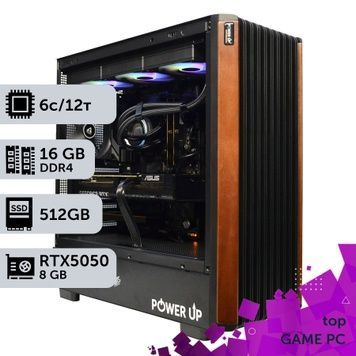
| GPU connection | GPU-Z, "Bus Interface" row | x16 for RTX 4070, RTX 5070 and above, Radeon RX 9060 XT and RX 9070 XT. The RTX 3050, 4060, 4060 Ti, 5050, 5060, and 5060 Ti are designed for x8 — this is a feature of the model, not a defect. At idle, the PCIe version may display lower due to power saving |
| Monitor cable | Rear panel of the case | Must be plugged into the graphics card, not the motherboard — otherwise, there will be no image or games will run on weak integrated graphics |
| Thermals and stability | 10–15 minutes of a benchmark or game, monitoring via HWiNFO | No crashes or errors, CPU and GPU do not trigger Thermal Throttling |
| Noise | At idle and under load | No rattling or abnormal vibrations. A faint coil whine from the GPU at hundreds of FPS is common in many models and disappears when capping the frame rate |
| Case and documents | Visual inspection, warranty card | No chips or cracks; warranty card has the sale date and store stamp; if component boxes are provided, keep them: full packaging is required for warranty service |
| Windows | Settings → "Activation" | The system is installed for testing purposes and is not activated; a license key must be purchased separately |
Do not remove the warranty seals on the case or the stickers with serial numbers: damaging them is grounds for voiding the warranty service.
Warranty and Service for Buyers in Kyiv
The gaming PC comes with a 24-month warranty covering the entire computer, verified by a warranty card. For a Kyiv resident, the main advantage is that repairs are handled in the same office where the PC was assembled: you can bring it in yourself without waiting for a courier. On average, repairs take 1–2 days, and a loaner pool is available if we need to wait for replacement parts. If you send the PC to the service center via Nova Poshta or taxi, the buyer covers the shipping costs. Full terms can be found on the Warranty, Exchange, and Returns page.
| Situation | What to do |
|---|---|
| Doesn't turn on, reboots randomly, or shows screen artifacts | Contact a manager and bring the computer with the warranty card to our office — repairs average 1–2 days |
| Need more RAM, an extra SSD, or a different graphics card | Coordinate upgrades with the store in advance: replacing parts yourself without notifying the seller voids the warranty |
| Want to overclock the CPU or RAM | Do so at your own risk: damage caused by incorrect BIOS settings is not covered by the warranty |
| The warranty has expired | We continue to service PowerUp computers post-warranty — check with a manager for terms |
| The computer didn't suit your needs | An unused PC with complete packaging can be returned or exchanged within 14 days; refunds are issued in 1–2 business days |
Which Build to Choose
- Full HD and esports — PCs for Full HD, builds with RTX 5060 and RTX 5050; the most affordable options are in the budget gaming PCs collection.
- 2K — PCs for 2K with RTX 5060 Ti 16 GB or RTX 5070 and 32 GB of RAM.
- 2K at 165 Hz and above — RTX 5070 Ti paired with a Ryzen 7 7800X3D or Ryzen 7 9800X3D.
- 4K — PCs for 4K with RTX 5080; the highest performance configurations are among our top-tier builds.
- Streaming and VR — Streaming PCs and VR PCs.
For 2K gaming and future-proofing, get a graphics card with 16 GB of memory — to learn why, read the article "How much video memory is needed in 2026". Prices by class and comparisons of Intel vs. AMD platforms can be found in the "Gaming PCs" section. If no pre-built configuration suits your needs, an engineer will put together a custom build for you, which can also be discussed during your office visit.
Need a Non-Gaming PC?
For work and study, check out our office PCs; for 3D, CAD, and rendering — workstations; for editing — video editing computers; for local neural networks — AI stations. You can pick out a monitor for your build in the monitors section, and in case of power outages, grab a UPS or power station.
Payment Methods for Kyiv Purchases
- Installment payments via PrivatBank and PUMB: apply online during checkout without visiting a bank. The number of payments and extra charges are listed on the Installments page.
- Wire transfer to a current account without commission; for companies — cashless payment with VAT (+7%).
- Cash on delivery at a Nova Poshta branch, 3.4% commission.
- For the most convenient payment method during local pickup, consult with a manager when confirming your order. All methods and fees are detailed on the "Payment and Delivery" page.