
It's easy to get lost in the world of PC hardware: AI writes template advice, bloggers argue themselves hoarse about "bottlenecks," and brands aggressively push "golden" components. We at Power Up (powerup.ua) decided to ditch all this marketing fluff.
This article is written by real people for people. Our goal is to squeeze the maximum pure performance (FPS) out of every dollar so that your PC serves you for 3–5 years.
In Short (For those who have no time to read):
- Optimal graphics card: Only RTX 5060 Ti and strictly with 16 GB of video memory.
- Processor without overpayments: Ryzen 5 5600 or Core i5-14400F will load the graphics card to 100%.
- Smart savings: Choose DDR4 (32 GB) instead of DDR5.
- No marketing: A 600-650W (Bronze) power supply and a basic 1-2 TB M.2 SSD are more than enough.
Table of Contents:
- Golden Rule: Hardware is more important than "wrappers"
- Graphics Card — the top priority
- Processor: destroying the "bottleneck" myth
- Where we save (without losing quality)
- Honest forecast: What a "PC for 3–5 years" means
- Ready-made solutions from Power Up (2026 builds)
- Important addition: choosing a monitor
- FAQ: Frequently Asked Questions about builds
Golden Rule: Hardware is more important than "wrappers"
If your budget has limits, you should invest in performance, not aesthetics. There is absolutely no point in buying a premium aquarium-style case with a bunch of RGB lighting, spending 20% of the entire PC cost on it. These lights won't add a single frame per second, but will ruthlessly consume resources that could have been invested in a more powerful processor or graphics card.
Let's face the truth with a simple example. Here is what the difference in approach looks like with the same budget:
| "Marketing Victim" PC (~60,000 UAH) | Rational Power Up PC (~60,000 UAH) |
| Liquid cooling with LCD screen (7000 UAH) | Reliable tower cooler (1000 UAH) |
| DDR5 with bright RGB lighting (20000 UAH) | 32 GB of fast DDR4 without lights (9000 UAH) |
| B-chipset motherboard (9000 UAH) | High-quality H-chipset board (4000 UAH) |
| Weak RTX 4060 8GB graphics card | Top-tier GeForce RTX 5060 Ti 16GB |
| Result: Glows beautifully, but lags | Result: +40% FPS for the same money |
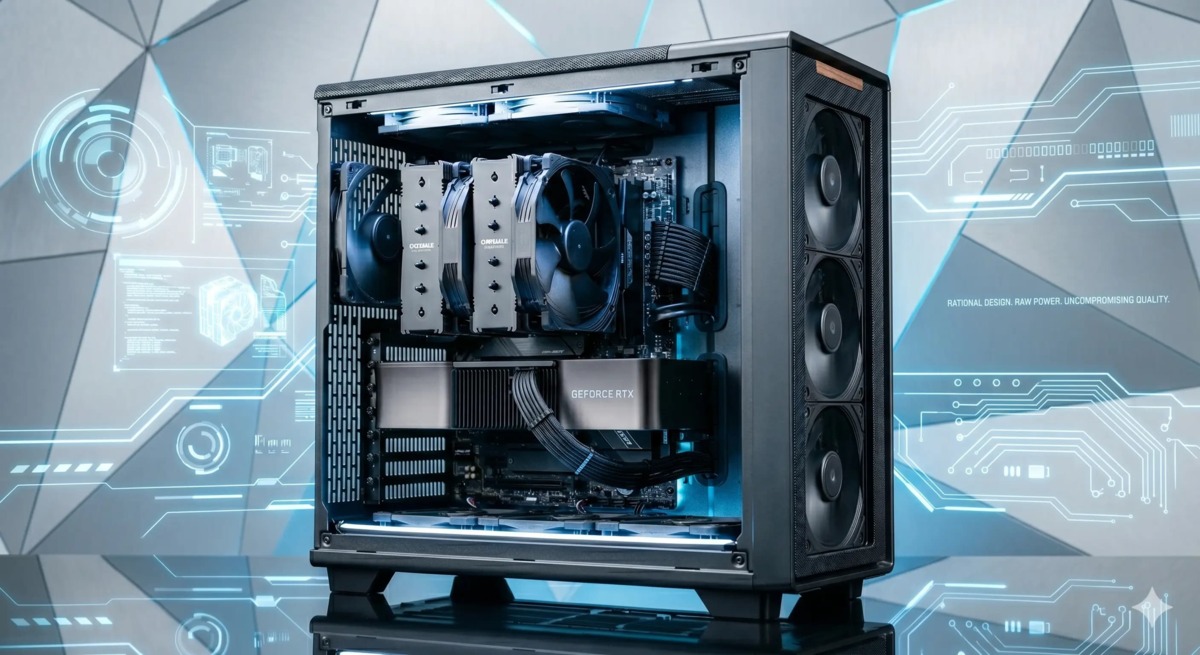
Does this mean we are offering a faceless grey box from the 2010s? Of course not! A rational PC looks modern. We use cases with excellent airflow featuring Mesh grilles on the front panel and a side glass. A proper case with a strict design and hidden cable management ensures perfect airflow and looks premium.
Graphics Card — the top priority and foundation for the future
Contrary to common myths about perfect "balance," it is the power of the graphics card that determines how comfortable your gaming experience will be. In the mid-price range today, we highly recommend focusing on the NVIDIA GeForce RTX 5060 Ti 16GB.
Why do we install this specific card? Here are the dry technical facts:
Latest generation and GDDR7 memory: This is a next-generation graphics card built on the most advanced architecture. The key advantage is the transition to ultra-fast GDDR7 video memory, which provides colossal bandwidth. It is this technological solution that unlocks the chip's potential to 100% and guarantees a performance reserve for years to come.
Ecosystem and Frame Generation (DLSS): Built-in NVIDIA Tensor cores use AI to draw intermediate frames. In demanding story-driven games, you get a "free" 40-60% FPS boost without losing image quality.
Energy efficiency: The new architecture delivers maximum performance for every watt of energy consumed. The card is cool, quiet, and runs without issues even with 550W power supplies.
What will you get in practice with the RTX 5060 Ti 16GB?
- Cyberpunk 2077 (Ultra settings, DLSS Quality, 1080p): ~95+ FPS
- S.T.A.L.K.E.R. 2 (High settings, 1440p): ~75+ FPS
- CS2 / Valorant (Esports settings): 300-400+ FPS
FPS Comparison: Rational Build vs "Marketing Victim"
Tests were conducted paired with a Ryzen 5 5600 / Core i5-14400F processor
Processor: destroying the "bottleneck" myth
The most common buyer's fear: "What if this processor bottlenecks the graphics card?" Because of this myth, people make their biggest mistake — buying an expensive Core i7 or Ryzen 9, and taking a weak graphics card with the spare change. Let's break down the physics of the process based on facts:
- The Resolution Rule (1080p vs 2K): In lower resolutions, FPS does indeed depend on the processor, but when switching to 1440p (2K), the situation changes drastically. The graphics card is loaded at 99%, while the processor "rests." An expensive multi-core flagship won't give you extra frames, because the system has already hit the limits of the graphics card.
- Why games don't need 24 cores: The architecture of game engines is linear (calculating physics, geometry, AI logic). These tasks depend on each other, and they cannot be effectively parallelized into 16 or 24 independent threads (as is done when rendering video or in servers). Therefore, 6 powerful, high-frequency cores — is the physical limit of what a modern game can "digest." Anything more — will simply sit idle.
- Conclusion: Modern mid-range processors (AMD Ryzen 5 5600 or Intel Core i5-14400F) with their 6 cores and excellent cache are more than enough to load the RTX 5060 Ti to 100%.
Intel or AMD? What to choose in 2026?
In the mid-budget segment, both manufacturers offer excellent solutions. The choice depends only on your tasks:
- AMD Ryzen 5 (AM4 Platform): The king of price/FPS ratio in pure gaming. The platform is incredibly reliable, inexpensive, and most importantly — leaves you a loophole to install the legendary X3D series gaming processors (where the volume of that very L3 cache is tripled) in the future.
- Intel Core i5 (For example, 14400F): Your choice if, besides games, you do heavy work (video editing, 3D modeling, streaming). Thanks to the presence of additional energy-efficient cores (E-cores), this processor handles multitasking superbly.
Where we save (without losing quality)
To fit a powerful graphics card into an adequate budget, you need to know how to set priorities correctly. One of the main points of savings — is the motherboard.
Motherboard: a reasonable minimum instead of a "marketing reserve"
A myth circulates online that you need to buy an expensive motherboard "for future growth." However, practice shows: by the time you really lack the power of your current processor, the generations of sockets on the market will have already changed. For processors like the Intel Core i5-14400F or Ryzen 5 5600, boards on basic chipsets (H610 and A520 respectively) are more than enough. Here are the dry facts:
Power (VRM): The processors we selected have moderate power consumption (on average 65–100 W under load). Even basic H/A-series boards easily cope with such a load without overheating. Overpaying for massive heatsinks and 16-phase power on more expensive boards in this case simply makes no sense — the processor will not work faster just because it sits in an "elite" board.
Overclocking and frequencies: The era of manual processor overclocking is in the past — modern Turbo Boost algorithms squeeze the maximum out of the cores themselves. Boards on H610 and A520 allow memory to run at its standard high frequencies, ensuring full system performance "out of the box" without unnecessary manipulations in the BIOS.
Interfaces and peripherals: The bus bandwidth on these boards is more than enough for a graphics card of the RTX 5060 Ti level and modern high-speed NVMe SSDs. You get exactly the same FPS in games as on a board that costs three times as much.
What to choose in 2026: DDR4 vs DDR5 for gaming
We recommend giving preference to the proven DDR4 in most mid-segment builds. The numbers and logic speak for themselves:
Minimal performance gain: Despite the marketing noise around new standards, the real difference in frame rates between high-quality DDR4 (3200 MHz) and significantly more expensive DDR5 (6000 MHz) in games averages a measly 2–5%. It is impossible to notice such a difference by eye.
Build price: The transition to DDR5 requires not only more expensive memory sticks, but also an appropriate motherboard. In total, such a bundle will cost 40–50% more. From a gaming experience perspective, it is much more rational to invest this money in a graphics card with more video memory — this will provide exponentially more benefits.
The question of volume: 16 GB or 32 GB?
32 GB — is our "gold standard." Modern open-world games easily consume over 20 GB of system resources, and such a volume guarantees perfect smoothness without stuttering.
16 GB — is a reasonable compromise if your budget is very tight and you want to play today. This amount is still sufficient for most popular titles, however, you should be prepared that in the heaviest new releases or with a large number of background programs, the system may run out of memory, which will lead to slight hiccups during gameplay.
Answer to "armchair analysts": We foresee the comments: "What AM4 and DDR4? You are recommending old junk!" We answer: a build on the newest AM5 will eat up an extra 10-15 thousand hryvnias. Taking them out of the budget, you will have to install a weak graphics card. As a result, an AM5 PC with a cut-down card will deliver less FPS than an AM4 with a top-tier RTX 5060 Ti 16GB. We sell frame rates, not the novelty of the PCB.
Marketing traps (SSDs and Power Supplies)
A "Gaming" SSD with a giant heatsink and a PSU with a platinum certificate — is a classic marketing tax. Dry facts:
Facts about SSD drives:
- Myth: You need a super-fast Gen5 SSD at 10,000 MB/s.
Fact: Game engines do not have time to unpack data at such a speed. The difference in level loading speed between a basic NVMe (3500 MB/s) and a premium SSD for $200 will be only 1–2 seconds. - Myth: An M.2 drive in games will burn out without a separate expensive heatsink.
Fact: In games, an SSD does not experience a 100% load, so we recommend proven drives with average speeds — they practically do not heat up and do not require cooling. Meanwhile, top-tier PCIe 5.0 drives with "wild" reading speeds get so hot that they need not just heatsinks, but almost personal fans, which is absolutely excessive for a gaming build.
Facts about Power Supplies (PSUs):
- Myth: A modern graphics card needs a power supply of at least 850 Watts.
Fact: A Ryzen 5 5600 processor consumes ~65 W, and an RTX 5060 Ti graphics card — ~160 W. The peak total load of the entire system in games rarely exceeds 250-280 W. - Conclusion: A high-quality 550-650W PSU with an 80+ Bronze/Standard certificate will suffice with a huge margin. At such a load, the unit operates at half capacity, delivering its maximum efficiency.
Honest forecast: What does a "PC for 3–5 years" mean?
Marketers often lie, promising "everything on ultra forever." Let's be completely honest. Here is what the real life cycle of a rational build (based on the RTX 5060 Ti 16GB) that you buy today looks like:
- Year 1–2: You play on absolute Ultra settings, enjoying maximum FPS. You don't worry about a thing.
- Year 3–4: In the heaviest new releases, you switch to "High" settings and turn on DLSS. The picture remains excellent, with no drops.
- Year 5 and beyond: You play on "Medium" settings with a stable 60 FPS, or you make a targeted upgrade (simply buy a new graphics card, keeping the rest of the hardware).
Ready-made solutions from Power Up
We have selected two optimal configurations that fully realize this sober, pragmatic calculation. No overpayments, just pure FPS.

"People's Champion" on AM4: GamePC Lite #492
- Processor: AMD Ryzen 5 5600
- RAM: 32 GB DDR4
- Storage: High-speed 1TB SSD
- Graphics Card: GeForce RTX 5060 Ti 16GB

"Gaming Benchmark" on Intel: GamePC Top #495
- Processor: Intel Core i5-14400F
- RAM: 32 GB DDR4
- Storage: Capacious 2TB SSD
- Graphics Card: GeForce RTX 5060 Ti 16GB
Important addition: Don't kill your PC's potential with an old monitor
Above we looked at excellent systems for 2K gaming. But if you connect such a PC to an old Full HD monitor at 60 Hz, you simply won't see the difference. The powerful graphics card will sit idle, and the picture will remain the same.
To get the maximum experience from smooth graphics and high FPS, we recommend immediately upgrading your display to modern 144–165 Hz.
Choose a gaming monitor →FAQ: Frequently Asked Questions about builds
Is this PC enough for streaming on Twitch/YouTube?
Yes. The power of the processors (Ryzen 5 5600 / Core i5-14400F) combined with the NVENC hardware encoder from the RTX 5060 Ti graphics card is enough for high-quality streaming in 1080p at 60 frames per second without losing FPS in the game itself.
Will the build run new Unreal Engine 5 games?
Yes. That is exactly why we install the 16 GB version of the graphics card. The amount of video memory combined with DLSS technology allows you to consistently deliver 60+ frames on high settings in the most demanding modern releases (including S.T.A.L.K.E.R. 2).
Will it be possible to add RAM or a hard drive later?
Of course. The motherboards in our builds have free slots for RAM, as well as SATA and M.2 ports for installing additional SSD or HDD drives. Upgrading memory takes 5 minutes.
Our ironclad guarantees
We stand behind our builds not just in words. Every gaming PC comes with a full 2-year warranty. And if something happens, you won't have to wait 14–30 days for repairs. Thanks to our own exchange fund of parts in our warehouse, the average warranty repair time at Power Up is a record 1-2 days!
Confused? Ask an expert
Don't want to delve into memory timings and benchmarks? Write to our expert Vladimir. No bots — tell him what games you play, and he will drop you 2-3 ideal options without overpayments.
Want to see other options?
We understand that everyone has their own budget. Go to our main catalog of gaming computers. There we have gathered dozens of balanced configurations: from reliable starter machines to uncompromising monsters for 4K gaming.
Go to the gaming PC catalog →

































